
The scenario
Imagine you are coordinating an all-hands meeting for a small company:
- It’s a three-day, out-of-town event.
- You’ll have roughly a hundred people attending.
Everyone attending got a hastily assembled Microsoft Forms survey, and the responses have come in: now you’re looking at the dietary restrictions column, and it’s full of mismatched, free-response data.
At this stage, you have to consider your constraints:
- You have to protect the privacy of this information; you must not overshare with the catering company.
- Not everyone is attending all three days; the catering order needs to be broken out by day, and the attendee counts are different for each day.
Whether or not you actually have managed offsite company-wide events, you have probably attended them and marveled at or bemoaned the logistics. Most professionals can relate scenarios in their day-to-day work that suffer this kind of disarray.
To start getting everything on track, you need to prepare two key documents:
- A catering brief that describes meal counts by dietary profile, per-day requirements, and with flags for anything the catering company needs to act on.
- An admin task list that outlines the incomplete or ambiguous responses you need to follow up on before the order goes in.
Both documents have different audiences, different needs, and different levels of detail. We also need to make sure nothing falls through the cracks for the person who said cross-contamination is a serious concern.
This is the kind of task where AI either earns its keep or reveals its limits pretty quickly.
What you'll need
- The Waypoint RSVP form data (see top of page)
- Access to any chat-based AI platform
- Demo video (if preferred - see top of page)
- About 10 minutes
What you'll produce
- A Catering Brief PDF ready to be sent to a catering company
- A short internal follow-up list for your own reference
The steps
(1) Open a fresh chat window. Navigate to your AI platform of choice and start a new conversation.
a. ChatGPT: chatgpt.com
b. Claude: claude.ai
c. Gemini: gemini.google.com
Note: A fresh window matters here. Previous replies in the same conversation can influence subsequent responses, a subject that we’ll dive into later. Starting from a fresh conversation for this demo means we’ll get consistent results.
(2) Paste the provided prompt into the AI chat. Copy the provided prompt (see in section below) fully and paste it into the chat box. Don’t click submit yet!
Note: Don’t modify the prompt for this exercise. We’ll discuss what each part is doing (and why) in the next section.
(3) Attach the RSVP file. Use the attachment or file upload button in your platform to attach the Waypoint RSVP data file (see button at top of page to download).
Note: Attachment options can vary by platform and might require an account in some cases. If you can’t attach the file directly, don’t worry, you can also open the file in Microsoft Excel or Google Sheets, copy everything, and paste the contents below the prompt in the chat window.
(4) Submit the prompt and review the results. Click the Submit button or press Enter in the chat field to send the prompt to the AI.
a. When the response comes back, read it with the original data open in a separate window.
b. Notice what was organized, what was flagged, and how the AI manipulated the data.
Note: Instead of just noticing whether or not the data looks correct, check whether or not it’s actionable. Could this be sent to a catering vendor? Are the follow-up action items sensible and useful?
The prompt
Here’s the prompt for this process. Use it as it’s written at this stage; we’ll explain the various pieces involved shortly.
I’m Jane Doe, Office & Facilities Coordinator at Waypoint Natural Foods. I’m preparing a catering brief for our company all-hands on March 10–12, 2026, in Bend, OR. The responses below are our full confirmed RSVP list.
Please produce two things:
1. A catering brief in PDF format to send directly to our vendor. Organize it by day, with a count of how many meals of each dietary type are needed per day. Where someone has multiple restrictions, keep them together as a single combined entry rather than splitting across categories. No individual names, counts only. Flag anything the caterer needs to act on, like allergy-level restrictions or protocol questions.
2. A short internal follow-up list for me. Anything in the data that’s incomplete, ambiguous, or needs a decision before the order goes in (names are fine here since I’ll be following up personally).
Before producing the final output, use code or calculation tools to verify all counts against the source data. Keep both clean and straightforward.
You might be used to using simpler prompts, like “summarize this document into a catering request.” Or perhaps you think this prompt feels minimal, based on the more-detailed prompts you’re used to. At Prowess Consulting, we think this is just about the right level of detail to get useful work done in this situation. Here’s why:
- The whole prompt is written in human-readable English. There’s no specific syntax or special code used.
- Some parts of the prompt are broad “the responses below are the full confirmed RSVP list” statements, and other parts are specific “No individual names, counts only” statements.
What comes back
After completing the steps provided earlier, the catering brief comes back with neatly organized tables for each day. Each table lists the dietary profile in plain language and the count for each individual combination. People with multiple restrictions are kept together as a single combined entry, exactly as requested. For example, “No red meat + lactose intolerant (combined)” shows up as one row, not two.
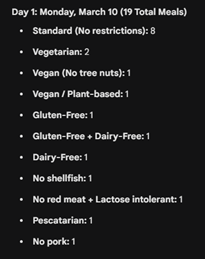
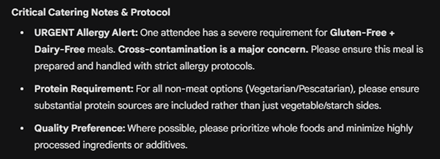
The AI’s response also flags items for the vendor in a clearly marked section:
- The guest with GF + dairy-free is elevated to an allergy-level flag, with a note that cross-contamination protocol is required. The AI pulled this notice from the guest’s own note in the spreadsheet and then translated it into something a catering vendor would understand and act on.
- The guest listed as vegan, no tree nuts is flagged separately, with a note about cross-contact risk in shared preparation environments.
- There is also a service note for the pescatarian guest who had mentioned wanting “solid protein options throughout.” The brief captures the spirit of that request without quoting the casual language verbatim.
The internal follow-up list provided by the AI is a different document with a different shape:
- A colleague named Dana, who a different attendee mentioned in passing as “probably coming” but who had never submitted an RSVP
- A response flagging a dietary preference (“avoid highly processed food”) that cannot be communicated to the caterer as written and needs clarification
- Two attendees who had used first name and last initial only on the form, which doesn’t present a catering issue, but which is flagged in case full names are needed for badges
- Two late submissions that came in on Day 1 itself—one of them listed Day 1 attendance, which raised a question about whether they were actually there or whether their effective attendance started Day 2
At this stage, none of this AI output has required manual cross-referencing. It all came from one prompt and one attachment.
Looking for more context?
Interested in learning more?
- Contact us with questions, feedback, or to meet with our team!
- Visit our Responsible AI page to learn more about our frameworks.
- Watch our Agentic AI foundational series with Julian to learn how you can apply this in real time.
- Read more about our Agentic AI solutions.
*Copyrighted material. All rights reserved. Free for personal use. No copying, publication, or redistribution without written permission from Prowess Consulting, LLC.