

There are now thousands of articles explaining that AI can “supercharge your productivity.” Most of them are written by people who have never had to send a catering order on a deadline, answer 17 questions about whether the conference room has a whiteboard, and also somehow finish their actual work before 5 PM.
This series is not that.
In this series, each post examines a real, concrete task. We’ll provide the materials you need to complete the tutorial, walk through exactly what to give the AI to execute against, what to expect back, and then, crucially, explain why the process and prompts involved work when they work, and what breaks when things go wrong, so that you can continue to use the lessons learned for your own work.
This Actually Helpful AI Tutorials series is for the people running the behind-the-scenes machinery at their organizations. Office coordinators, executive assistants, operations staff, and the lone finance person who somehow ends up heroically sacrificing their evenings to plan every company event. It’s for people who are good at their jobs, stretched too thin, and have heard enough about AI to be curious but have also been burned by it enough times to be skeptical.
Skepticism is healthy. You should be skeptical. But I also think there’s a version of this technology that can genuinely earn your trust, because it can be used consistently once you know how it ticks. What you need to reach this stage is a solid theoretical foundation that you can build a workflow around. More doing, less talking.
Let’s start with something that probably sounds familiar.
The scenario
Imagine you are coordinating an all-hands meeting for a small company:
- It’s a three-day, out-of-town event.
- You’ll have roughly a hundred people attending.
Everyone attending got a hastily assembled Microsoft Forms survey, and the responses have come in: now you’re looking at the dietary restrictions column, and it’s full of mismatched, free-response data.
At this stage, you have to consider your constraints:
- You have to protect the privacy of this information; you must not overshare with the catering company.
- Not everyone is attending all three days; the catering order needs to be broken out by day, and the attendee counts are different for each day.
Whether or not you actually have managed offsite company-wide events, you have probably attended them and marveled at or bemoaned the logistics. Most professionals can relate to scenarios in their day-to-day work that suffer this kind of disarray.
To start getting everything on track, you need to prepare two key documents:
- A catering brief that describes meal counts by dietary profile, per-day requirements, and with flags for anything the catering company needs to act on.
- An admin task list that outlines the incomplete or ambiguous responses you need to follow up on before the order goes in.
Both documents have different audiences, different needs, and different levels of detail. We also need to make sure nothing falls through the cracks for the person who said cross-contamination is a serious concern.
This is the kind of task where AI either earns its keep or reveals its limits pretty quickly.
Getting effective results: The prompt is the process
Most AI tools will produce something from almost any input. But the gap between something and something useful is almost entirely in how you approach the prompt. This tutorial focuses on that gap.
The following steps should work on any major chat-based AI platform: ChatGPT, Claude, Gemini, Microsoft Copilot, or whatever else you have available. You won’t need an account to follow along, as we designed this exercise to work even without signing in.
What you'll need
- The Waypoint RSVP form data
- Access to any chat-based AI platform
- About 10 minutes
What you'll produce
- A Catering Brief PDF ready to be sent to a catering company
- A short internal follow-up list for your own reference
Procedure
The steps
(1) Open a fresh chat window. Navigate to your AI platform of choice and start a new conversation.
a. ChatGPT: chatgpt.com
b. Claude: claude.ai
c. Gemini: gemini.google.com
Note: A fresh window matters here. Previous replies in the same conversation can influence subsequent responses, a subject that we’ll dive into later. Starting from a fresh conversation for this demo means we’ll get consistent results.
(2) Paste the provided prompt into the AI chat. Copy the provided prompt (see in section below) fully and paste it into the chat box. Don’t click submit yet!
Note: Don’t modify the prompt for this exercise. We’ll discuss what each part is doing (and why) in the next section.
(3) Attach the RSVP file. Use the attachment or file upload button in your platform to attach the Waypoint RSVP data file (see button at top of page to download).
Note: Attachment options can vary by platform and might require an account in some cases. If you can’t attach the file directly, don’t worry, you can also open the file in Microsoft Excel or Google Sheets, copy everything, and paste the contents below the prompt in the chat window.
(4) Submit the prompt and review the results. Click the Submit button or press Enter in the chat field to send the prompt to the AI.
a. When the response comes back, read it with the original data open in a separate window.
b. Notice what was organized, what was flagged, and how the AI manipulated the data.
Note: Instead of just noticing whether or not the data looks correct, check whether or not it’s actionable. Could this be sent to a catering vendor? Are the follow-up action items sensible and useful?
The prompt
Here’s the prompt for this process. Use it as it’s written at this stage; we’ll explain the various pieces involved shortly.
I’m Jane Doe, Office & Facilities Coordinator at Waypoint Natural Foods. I’m preparing a catering brief for our company all-hands on March 10–12, 2026, in Bend, OR. The responses below are our full confirmed RSVP list.
Please produce two things:
1. A catering brief in PDF format to send directly to our vendor. Organize it by day, with a count of how many meals of each dietary type are needed per day. Where someone has multiple restrictions, keep them together as a single combined entry rather than splitting across categories. No individual names, counts only. Flag anything the caterer needs to act on, like allergy-level restrictions or protocol questions.
2. A short internal follow-up list for me. Anything in the data that’s incomplete, ambiguous, or needs a decision before the order goes in (names are fine here since I’ll be following up personally).
Before producing the final output, use code or calculation tools to verify all counts against the source data. Keep both clean and straightforward.
You might be used to using simpler prompts, like “summarize this document into a catering request.” Or perhaps you think this prompt feels minimal, based on the more-detailed prompts you’re used to. At Prowess Consulting, we think this is just about the right level of detail to get useful work done in this situation. Here’s why:
- The whole prompt is written in human-readable English. There’s no specific syntax or special code used.
- Some parts of the prompt are broad “the responses below are the full confirmed RSVP list” statements, and other parts are specific “No individual names, counts only” statements.
What comes back
After completing the steps provided earlier, the catering brief comes back with neatly organized tables for each day. Each table lists the dietary profile in plain language and the count for each individual combination. People with multiple restrictions are kept together as a single combined entry, exactly as requested. For example, “No red meat + lactose intolerant (combined)” shows up as one row, not two.
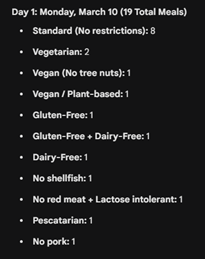
The AI’s response also flags items for the vendor in a clearly marked section:
- The guest with GF + dairy-free is elevated to an allergy-level flag, with a note that cross-contamination protocol is required. The AI pulled this notice from the guest’s own note in the spreadsheet and then translated it into something a catering vendor would understand and act on.
- The guest listed as vegan, no tree nuts is flagged separately, with a note about cross-contact risk in shared preparation environments.
- There is also a service note for the pescatarian guest who had mentioned wanting “solid protein options throughout.” The brief captures the spirit of that request without quoting the casual language verbatim.
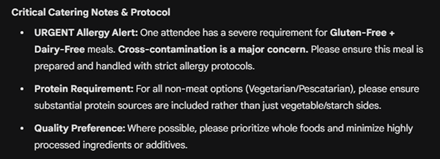
The internal follow-up list provided by the AI is a different document with a different shape:
- A colleague named Dana, who a different attendee mentioned in passing as “probably coming” but who had never submitted an RSVP
- A response flagging a dietary preference (“avoid highly processed food”) that cannot be communicated to the caterer as written and needs clarification
- Two attendees who had used first name and last initial only on the form, which doesn’t present a catering issue, but which is flagged in case full names are needed for badges
- Two late submissions that came in on Day 1 itself—one of them listed Day 1 attendance, which raised a question about whether they were actually there or whether their effective attendance started Day 2
At this stage, none of this AI output has required manual cross-referencing. It all came from one prompt and one attachment.
Why this prompt works: The art of context
AI language models are, at their core, pattern-recognition engines. They are good at seeing structure in data and reproducing that structure in the output, but only if you tell them what structure you want.
Clarity with one sentence
In simple terms, our prompt works because it reduces the number of things the AI has to guess. That might sound obvious, but it’s actually the whole game. A language model doesn’t know what you want; it infers it, based on everything you’ve given it and everything it’s seen before. The more guesswork the AI has to do, the more likely it is to make a reasonable-sounding choice that’s wrong for your specific situation. This prompt closes those gaps before they open.
A good example of this clarity is this tiny instruction within the larger prompt:
Where someone has multiple restrictions, keep them together as a single combined entry.
Without that sentence, the AI faces a dilemma:
- Does it split that employee’s two restrictions into separate rows?
- Does it keep them together as a single row?
Either approach could be reasonable, and without explicit instruction, the AI will simply pick one, likely without flagging that it picked anything at all. If it picks contrary to your intention, your headcount could end up wrong.
By anticipating this dilemma, the prompt uses one sentence to eliminate the whole issue. The general principle motivating this sentence is simple: any time there’s a rule that isn’t obvious, state it. You don’t need to anticipate every edge case, just the ones that matter to you.
Giving the AI permission to craft the right things
The two-output structure in the prompt (that is, “please produce two things”) matters for a similar reason:
- When you ask for one thing, the AI optimizes for one audience.
- When you explicitly ask for two things with different rules (for example, “no names in the vendor doc,” and “names are fine in the internal list”), the AI can address both requirements at once and route information accordingly.
This structure is why the cross-contamination note ends up in both documents, but it reads completely differently in each. The AI didn’t do that because it’s clever; it did it because the prompt told it exactly who each document was for.
Job titles are context
This last piece is very important. We grounded our prompt in a real role doing a real job. This technique is not intuitive, and it can be harder to articulate, but it’s definitely worth knowing. Including the statement “I’m Jane Doe, Office & Facilities Coordinator” isn’t just there for show, it’s a signal about formality, stakes, and relationship to the vendor. It shifts the tone of the output from a generic document to something that reads like a competent professional produced it, because the AI has a clearer picture of who the document is for and what they’d actually send.
None of this is magic. It’s just specificity strategically applied.
Points worth remembering
As you start using these prompting strategies in your everyday work, it’s worth remembering some important points:
- You are not going to get this perfect on the first try every time. That’s fine. The right mental model is iteration, not perfection. Read your AI outputs critically, the same way you’d read a first draft from a new hire. Notice what the AI got right, notice what it missed, and adjust accordingly. AI is not a vending machine, it’s closer to a very fast, very literal collaborator who needs good direction.
- The AI doesn’t know what it doesn’t know. In our example, Dana (the attendee who never submitted an RSVP) was surfaced because a different attendee mentioned her in a notes field. The AI caught that, which is great, but if no one had mentioned Dana at all, she wouldn’t have appeared. The output is only as good as the input. “Garbage in, garbage out” still applies here.
- Write prompts the way you’d explain the task to a new colleague. Plain language beats jargon almost every time. You don’t need to write prompts in any special syntax, and you don’t need to learn “prompt engineering” as a skill. Be specific about what you want, tell the AI what matters, and mention any rules that aren’t obvious. That’s it.
- Large language models (LLMs) love patterns. This is worth repeating because it’s the single most useful thing to keep in mind. When your input has a recognizable structure (even an informal structure, like an ad-hoc spreadsheet) and your output has a clearly defined shape, the results get a lot more reliable. The example catering brief task works well because we put a structured spreadsheet in, we ask for a structured document out, and we give explicit rules for the tricky parts. That’s the pattern. You can apply it to a lot of things.
Wrap up and what's next
In this tutorial, AI didn’t solve the problem by being clever. It solved it by seeing all of the connections in the context we provided through the prompt. That’s the pattern we’ll keep returning to in this series: AI can effectively work with real inputs—if it has clear direction and sufficient context. Goodness in, goodness out.
In the next post, we’ll take on a slightly more sophisticated task, using the same approach to show where AI helps, where it doesn’t, and how to tell the difference before you bet real work on it.
Afterword: Where AI usually fails and why this example didn't
If you’ve read this far, you’re clearly curious about getting more out of your LLM. Here’s some more insight on what can go wrong and go right with AI based on prompting.
If you’ve tried using AI for something like our example before and walked away frustrated, it’s probably looked like one of these scenarios:
- You provided the AI with raw data and asked it to “summarize.” Simply asking the AI to summarize is one of the vaguest instructions you can give. Consider questions like
- Summarize for who?
- In what format?
- Emphasizing what elements?
Without providing explicit clarification of your needs, the AI will produce something because it always does, but it’ll be averaging across every possible interpretation of that question, which isn’t going to help if you have a specific goal in mind, such as placing a catering order.
- Not providing the right amount of background information. This one’s counterintuitive, because the instinct when working with AI is often to clean things up before handing them over. It’s kind of how we’re used to working with computers already: tidy the spreadsheet, normalize the language, and remove the informal notes. Resist that instinct! The messiness in the RSVP data is actually doing a lot of work. The casual aside about cross-contamination, the attendee who mentioned an unregistered colleague in a notes field, the guy who wrote “back on the line day 2″—all of this informal information provides texture that gives the AI material to reason with.
A good way of thinking about AI prompting is that AI is “searching for the signal.” Every detail you include is another data point it can use to make better guesses about what matters, what’s ambiguous, and what needs to be flagged. The more background the AI has, the fewer blanks it has to fill in on its own, which is where problems in quality tend to arise.
The fix, in almost every case, is not using a different AI tool, it’s providing a clearer prompt. And clearer doesn’t always mean longer, it simply means being clear about your outputs, rules, and what matters.
“The gap between something and something useful is almost entirely in how you approach the prompt.”
– Julian Lancaster, CISO, Prowess Consulting
Ready to try?
Interested in learning more?
- Visit our Responsible AI page to learn more about our frameworks.
- Read our blog to gain a framework for “dialing in” agentic AI.
- Watch our Agentic AI foundational series with Julian to learn how you can apply this in real time.
- Read more about our Agentic AI solutions.

Julian Lancaster
*Copyrighted material. All rights reserved. Free for personal use. No copying, publication, or redistribution without written permission from Prowess Consulting, LLC.
Related Posts

AI Agents Don’t Replace Your Systems. They Live in the Seams Between Them.
The three ideas behind every agent we’ve shipped: the seams, the inversion, and the epiphany.

Episode 13: Learning, Leading, and Thriving in the Age of AI
Dr. Tanushri Banerjee explores how AI is transforming education from the inside out — from personalised learning paths and responsible AI use in classrooms, to
Episode 12: Future Skills for Finance Professionals with AI
Rushabh Shah unpacks how AI is transforming finance — from automating audits and building business models in hours, to why fundamentals, contextual thinking, and curiosity